How to Receive Fiverr Payments in Nigeria
Learn how to withdraw Fiverr earnings in Nigeria through Payoneer, add a USD bank account such as Palremit, and convert dollars to naira when needed.
You have completed a Fiverr order, the client has accepted your work, and your earnings are ready. Now you want to withdraw the money and receive it in Nigeria without converting your dollars earlier than you need to.
One option to explore is using a Palremit USD account as your bank withdrawal destination through Payoneer. Fiverr connects its bank-transfer and Payoneer payout options through Payoneer; you do not simply enter a US routing number on Fiverr's standard withdrawal page. Instead, you connect Payoneer to Fiverr, then check whether Payoneer will approve your Palremit USD account details as a withdrawal bank account.
If the account is accepted, you can withdraw your Payoneer balance to Palremit, hold the funds in USD, and convert to naira in Palremit when you need local money.
Here is how the process works and what to check before sending your earnings.
How Fiverr payments work in Nigeria
Fiverr does not make every completed order immediately withdrawable. After an order is marked complete, standard freelancers generally wait 14 days for the earnings to clear. Eligible Seller Plus, Top Rated and Pro Talent freelancers may have a seven-day clearance period. Your Earnings page shows when the money becomes available.
Once the earnings are available, Fiverr lists Payoneer options among its withdrawal methods:
- Payoneer Account: sends the withdrawal to your Payoneer balance.
- Bank Transfer via Payoneer: sends the money through Payoneer to a bank account, with local-currency and USD-wire options shown in Fiverr's payout information.
For a freelancer who wants to receive and hold dollars in a USD account, the Payoneer Account route is the one to look at first. It places the funds in your Payoneer balance, from where you can attempt a separate withdrawal to your Palremit USD account.
How to receive Fiverr payments in your Palremit USD account
The process has two parts: connect Payoneer to Fiverr, then add your Palremit USD account inside Payoneer.
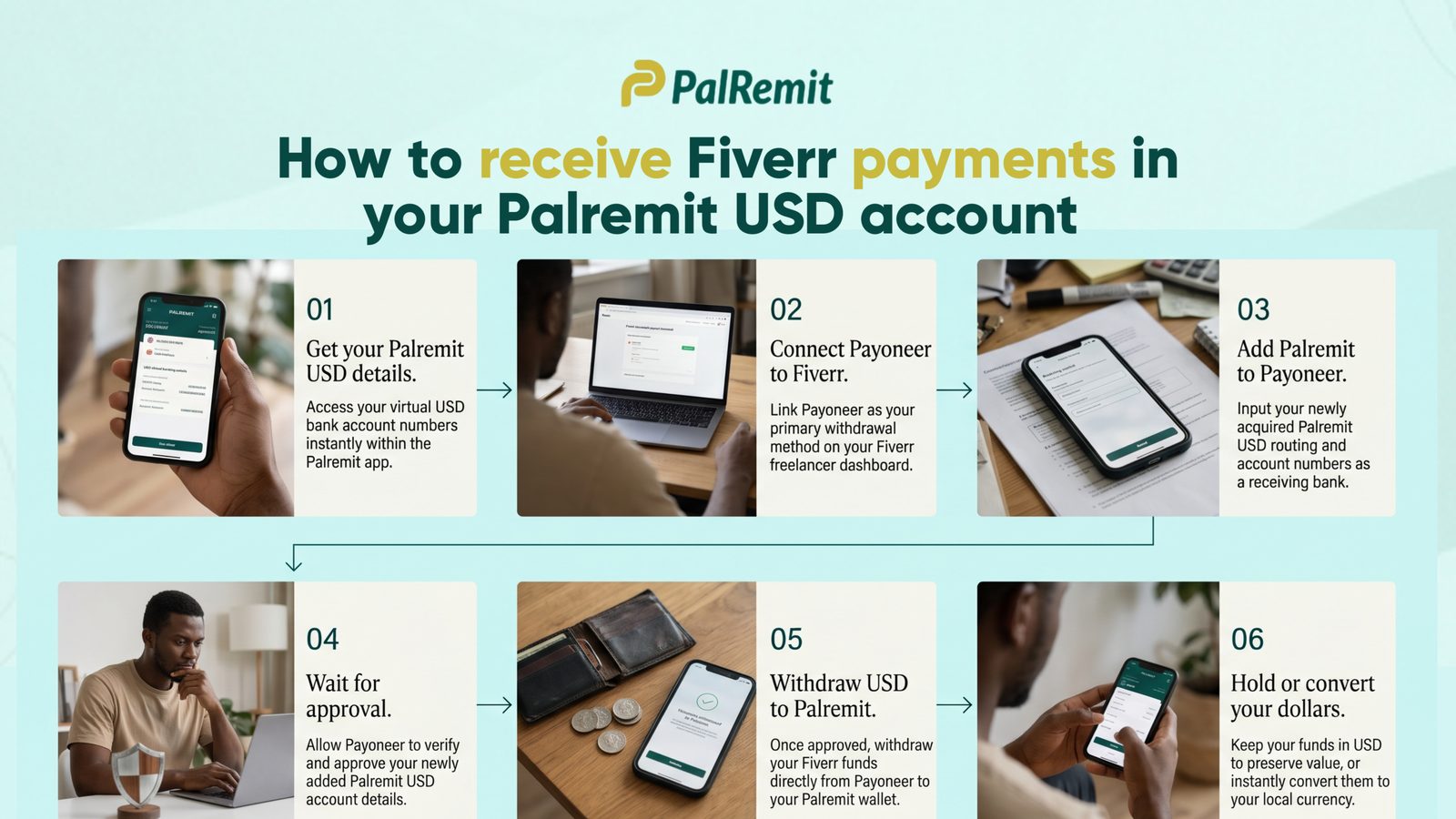
Step 1: Get your Palremit USD account details
Open the Palremit app and go to Deposit. Select USD and follow the instructions to access your account details.
Keep the details available. Depending on what Payoneer requests, you may need the account holder's name, bank name, account number, routing details and the account's supported transfer type.
Use the details exactly as they appear in the app. Do not guess a routing number or choose ACH or wire instructions that are not provided for your account.
Step 2: Connect Payoneer to Fiverr
On Fiverr:
- Open My Business and select Earnings.
- Choose Manage payout methods or Withdraw balance.
- Select Add payout method.
- Choose the Payoneer option.
- If you want the earnings sent to your Payoneer balance first, select Payoneer Account when Fiverr presents the available options.
- Follow the setup link Fiverr sends you and sign in to your existing Payoneer account, or complete Payoneer's registration if you do not have one.
- Complete any identity or account checks requested.
Fiverr allows only one active Payoneer withdrawal method at a time. It also applies a 24-hour waiting period after you add or change a withdrawal method, so do not expect to withdraw immediately after setting it up.
Step 3: Add your Palremit USD account in Payoneer
After your Payoneer account is ready:
- Sign in to Payoneer.
- Open Manage and select Your bank accounts.
- Choose the option to add a bank account for withdrawals.
- Enter the Palremit USD account details exactly as they appear in your Palremit app.
- Submit the details and wait for Payoneer's review.
Payoneer says an individual withdrawal bank account should be in the same account holder's name as the Payoneer account. It may ask for a bank statement or other documents to confirm that you control the account. Its published guidance says bank-account reviews usually take up to three business days.
Important: Payoneer must approve the Palremit account before you can use it for a withdrawal. Virtual USD account details are not automatically accepted just because they are valid receiving details. If Payoneer declines the account or does not offer the required USD withdrawal option, contact Payoneer support before trying another route.
Step 4: Withdraw your Payoneer balance to Palremit
Once Payoneer approves the bank account:
- Sign in to Payoneer.
- Go to Withdraw & transfer and choose Withdraw to bank.
- Select your USD balance.
- Choose the approved Palremit bank account.
- Enter the amount you want to withdraw.
- Review the exchange rate, fees, transfer currency and final amount before confirming.
Only continue if Payoneer shows that the transfer will be sent in USD using a transfer method supported by the account details in your Palremit app. If the screen only offers a local-currency withdrawal, check the details before confirming; that is not the same as sending dollars to a USD account.
Step 5: Hold your dollars or convert to naira
When the dollars arrive in your Palremit USD account, you can hold them in USD or convert them when you need naira.
For example, you may want to leave part of a Fiverr payment in dollars for an upcoming online subscription or business expense, then convert another part to naira for rent, food or other local spending.
In Palremit, check the exchange rate and the amount you will receive before confirming a conversion. Rates and fees can change, so use the quote displayed in the app at the time of the transaction rather than relying on an old rate you saw online.
Fiverr and Payoneer fees and withdrawal times
Your total cost depends on which Fiverr payout option you choose and what Payoneer charges for the onward withdrawal.
| Stage | Published timing | Published fee and minimum |
|---|---|---|
| Fiverr to Payoneer Account | Up to 2 business days | $3 fee; $10 minimum |
| Fiverr Bank Transfer via Payoneer, local currency | 1–3 business days | $3 fee; $20 minimum in Fiverr's Payoneer setup guide |
| Fiverr Bank Transfer via Payoneer, USD wire | 5–7 business days | $1 fee; $20 minimum in Fiverr's Payoneer setup guide |
| Payoneer bank-account review | Usually up to 3 business days | Review requirements may apply |
| Payoneer withdrawal to an approved bank | Timing and fees depend on the withdrawal shown in your account | Review the quote before confirming |
These are published figures, not a promise of the exact amount or arrival time for every Nigerian account. Fiverr and Payoneer may change their fees, eligibility rules and processing times. Check the figures displayed in your accounts before withdrawing.
Palremit's current terms and the details shown in your app should be checked for the applicable receiving and conversion charges. The final rate and fees displayed in the app are the figures to use when deciding whether to convert.
What to check before withdrawing
A few checks can save you from a delayed or rejected payment:
- Use accounts in your own name. Your Fiverr, Payoneer and bank-account details should belong to you. Payoneer requires an individual withdrawal bank account to match the name on the Payoneer account.
- Wait for account approval. Adding bank details is not the same as having them approved. Wait for Payoneer's confirmation.
- Check the transfer currency. If your aim is to receive USD, make sure the withdrawal is actually being sent in USD.
- Confirm the transfer type. Use only the ACH or wire instructions provided for your Palremit account and accepted by Payoneer.
- Check the fees before confirming. Look at the amount leaving Payoneer, any transfer charge, and the amount expected to arrive.
- Allow for processing time. Fiverr's withdrawal time does not include the time needed for account verification or any additional bank checks.
If a withdrawal is pending beyond the time shown by the provider, contact Payoneer with the transaction reference. If Payoneer says the transfer was completed but it has not appeared in Palremit, contact Palremit support with the transfer confirmation so the payment can be traced.
Why receive your Fiverr earnings in USD?
When you withdraw through a route that converts your earnings to naira, the conversion happens as part of that withdrawal. That may be convenient if you need naira immediately.
But if you would rather hold some or all of your earnings in dollars, receiving into a USD account gives you a different choice: hold the dollars first and decide when to convert.
With Palremit, you can access your USD account details in the app, receive eligible USD transfers, and check the naira amount and applicable charges before converting. That gives you more control over when you exchange your earnings.
The important thing is to compare the actual amount you will receive after all fees and conversion costs. Do not choose a route based only on the advertised withdrawal fee or an exchange-rate headline.
Frequently asked questions
Can I add my Palremit USD account directly to Fiverr?
Fiverr's standard bank-transfer payout is handled through Payoneer. For the route described in this guide, connect Payoneer to Fiverr first, then try adding your Palremit USD account as a withdrawal bank inside Payoneer. Payoneer must approve the account before you can use it.
Can I withdraw Fiverr earnings directly to a Nigerian bank account?
Fiverr offers Bank Transfer via Payoneer, including a local-currency option where available. The options, fees and timing shown to you depend on your account and location. Check Fiverr's current payout screen before choosing.
How long does it take to receive Fiverr money?
There are several stages. Standard Fiverr earnings generally clear 14 days after an order is completed, although eligible sellers may have a shorter clearance period. After that, Fiverr's Payoneer Account withdrawal is listed as taking up to two business days. Adding a bank account to Payoneer may take up to three business days for review, and the onward bank withdrawal has its own processing time.
Can I hold my Fiverr earnings in dollars?
You can aim to hold the funds in USD by using a USD withdrawal route and an approved USD bank account. Confirm that Payoneer offers a USD withdrawal to your approved Palremit account before submitting the transaction.
What if Payoneer does not approve my Palremit USD account?
Do not keep resubmitting different or altered account details. Check the reason for the rejection with Payoneer and confirm whether the account type and transfer rail are supported. You can also contact Palremit support to confirm the correct receiving instructions for your USD account.
Receive your freelance earnings with more control
Getting paid for your work is one part of freelancing. Deciding how and when to use that money is another.
If you want to hold eligible earnings in dollars before converting to naira, explore the Palremit USD account. Open the Palremit app, select Deposit, choose USD, and follow the prompts to view your account details. Then check with Payoneer whether those details can be added and approved for your withdrawal.
Open your Palremit USD account and choose when to convert your dollars.